
By the end of this section, you'll be able to:
- Start a finance report for a vehicle owned outright
- Review the vehicle valuation, and estimated equity - essential for many activities, including managing insurance and making next car decisions
Step 1: Open the vehicle record and find the finance section
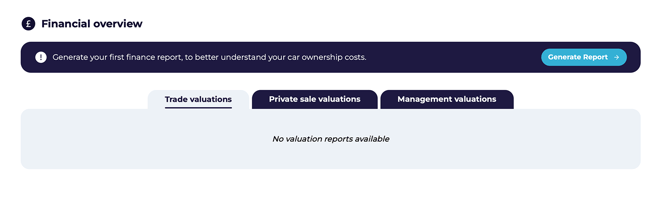
- Select the relevant vehicle record on the Vehicles page.
- Go to the Vehicle Data page by clicking on the relevant registration number.
- Scroll to the Financial Overview section.
- Confirm you're working on the correct vehicle before generating the report.
Step 2: Start the report and enter the initial finance details
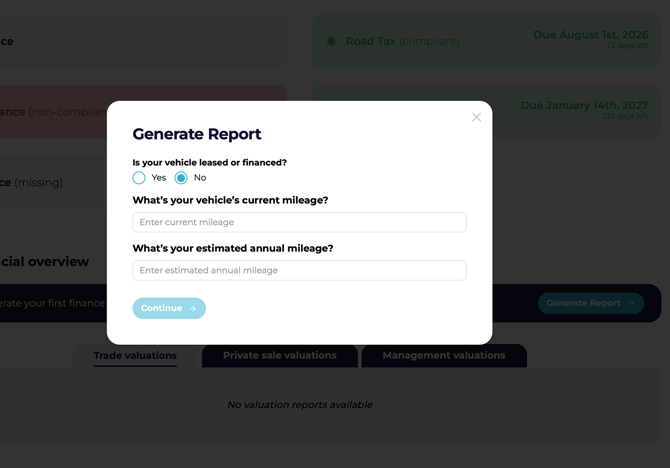
- Click Generate Report.
- In the pop-up, confirm No if the vehicle is financed.
- Enter the vehicle's current cumulative mileage.
- Enter the estimated annual mileage.
- Click Continue to let the platform identify the agreement type.
Step 3: Confirm the vehicle was purchased outright
- Click Continue.
- When prompted Did you buy your car with a loan?, select No.
- The report will move into the purchased outright-specific input section.
Step 4: Review the valuation details
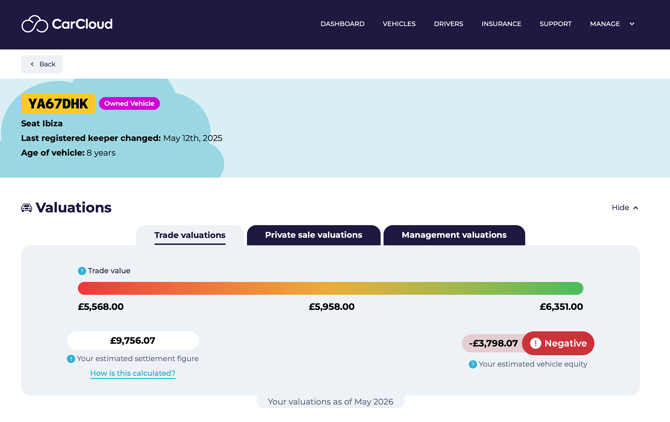
Once the report has been generated, you'll see the results displayed against the vehicle. For an outright-owned vehicle with no finance agreement, the focus is on valuations and the resulting equity.
Understanding the three valuation types
Every report shows the vehicle valued three different ways. Each tells you something different about the same vehicle:
|
Valuation type |
What it means |
|---|---|
|
Trade |
What a dealer would pay you. Tends to be on the low side. |
|
Private sale |
What you might get selling between two private individuals. Usually higher than trade. |
|
Management |
What your business expects to actually achieve — for example, where you've already got a buyer lined up. |
5. Overriding the management valuation
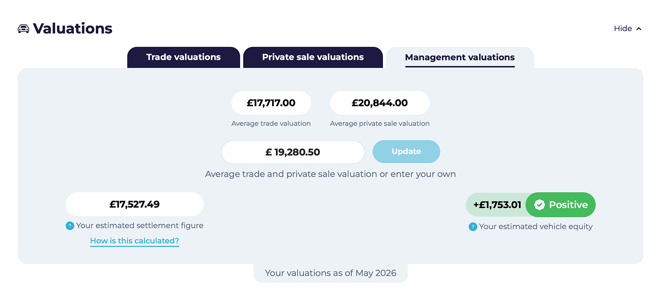
You'd typically override the management valuation when the vehicle's circumstances make the automatic figure misleading — for example:
- The vehicle has had significant work done that the standard valuation doesn't reflect.
- The vehicle's condition is materially better or worse than the trade and private sale averages suggest.
- You've got a specific buyer lined up at a known price.
To set a manual management valuation:
- Open the Management Valuations tab.
- Enter the new management valuation figure.
- Click Update to save.
What's next?
- Head to Lease and Contract Hire Finance Reports if you also manage leased vehicles.
- Head to PCP finance reports if you also manage PCP agreement types.
- Head to HP and conditional sale finance reports if you also manage HP agreement types.
- Visit the Vehicles Management page to review the wider vehicle record.