
By the end of this guide, you'll be able to:
- Generate a report for a car you own outright
- Understand the three valuation types
- Override the valuation when you know better
Step 1: Open your car
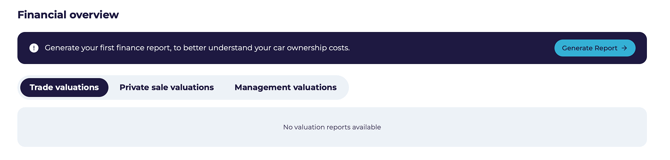 From My Vehicles, open the car and scroll to Financial Overview.
Step 2: Start the report
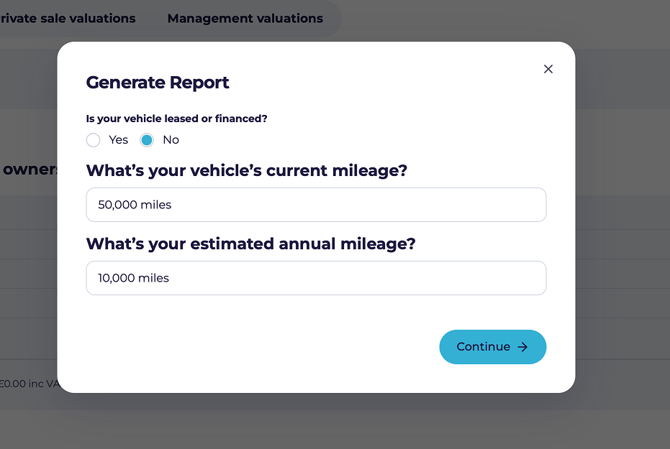
- Click Generate Report.
- Select No — the car isn't financed.
- Enter the current mileage and your estimated annual mileage.
- Click Continue.
- When asked Did you buy your car with a loan?, select No.
Step 3: What your car is worth
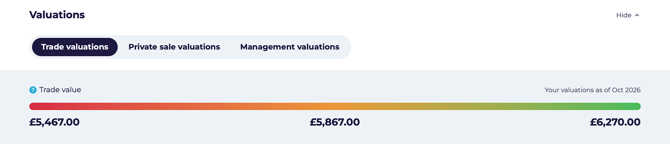
With nothing owing, the report is all about value. Your car is valued three ways:
Each may come with a low, medium and high range, so you can see the spread rather than a single number.
💡 Because you own the car outright, the valuation is your equity. There's nothing to deduct.
Step 4: Overriding the valuation
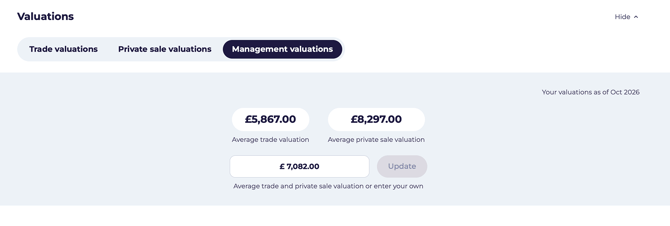 Sometimes the automatic figure doesn't reflect reality — perhaps the car has had significant work done, its condition is unusually good or bad, or you already have a buyer at an agreed price.
- Open the Management Valuations tab.
- Enter your figure.
- Click Update.
Why it's worth keeping current
- Insurance — most insurers want an up-to-date value, and being under-insured is an expensive surprise.
- Selling — knowing the trade and private figures tells you what convenience is costing you.
- Replacing — knowing what you'd get helps you judge what you can afford next.
💡 Keep your mileage up to date. It's the single biggest factor in the valuation after age.
What's next?
- See the guides for PCP, Hire Purchase, lease or loan if you have other cars.
- Head back to Your vehicle page for the full picture.