
By the end of this guide, you'll be able to:
- Find your way around the Digital Garage
- Read the Actions required panel and act on what it's telling you
- Use Upcoming actions to stay ahead of renewals
- Understand what your cars are worth and what you owe on them
Finding your way around
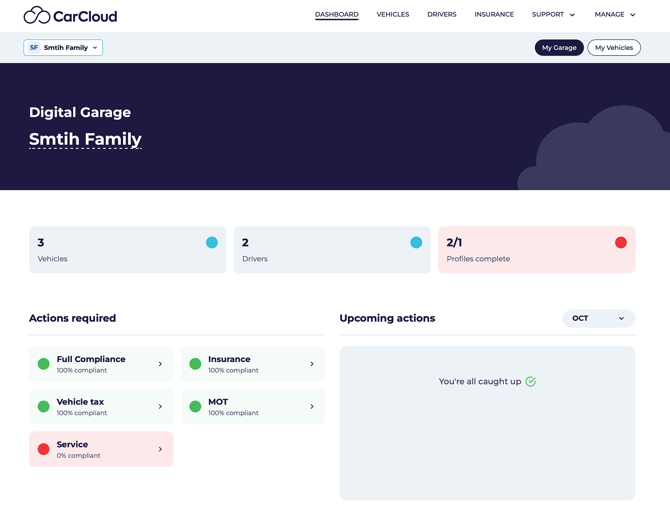 Across the top you'll find:
- Dashboard — your Digital Garage, this page
- Vehicles - manage your family vehicle in one plact
- Drivers - invite and manage your family drivers
- Insurance - manage your vehicle insurances in one place
- Support — get in touch with us
- Manage — your settings, family members and the Store
Two views sit at the top of the page: My Garage, the whole household, and My Vehicles, just the cars assigned to you.
Your headline numbers
- Vehicles — how many cars you're covering
- Drivers — how many family members have profiles
- Profiles complete — how many of them have logged in and finished setting up
Actions required
This is where CarCloud flags anything that needs your attention. Each item is colour-coded:
The items tracked are Full compliance, Insurance, Vehicle tax, MOT and Service. Click any one to see which car it relates to.
💡 First time here? Don't be alarmed if a lot is red. That just means we don't have the information yet — it's completely normal on day one. Adding your insurance renewal date and service date will turn most of it green.
How each check works
- Road tax and MOT — we check these automatically from your registration number and keep them up to date. You don't need to do anything except tax and test the car on time.
- Insurance — you tell us your renewal date, and we remind you before it's due.
- Service — you tell us when the next service is due.
Upcoming actions
This panel is your early-warning system. It shows what's coming up over the current month and the next two, so you can plan rather than react. Each entry is clickable and takes you to the relevant car.
What your cars are worth
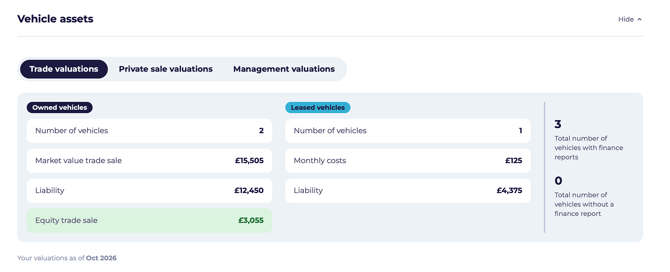 Once you've generated a finance report for a car, CarCloud shows you:
- Market value — what the car is worth. You can switch between Trade, Private sale and Management valuations.
- Liability — what's still owed, if the car is on finance.
- Equity — market value minus what you owe. This can be positive or negative, and either way it shapes what you do next.
Cars without a finance report yet are listed separately, so you know which ones to run.
Your CO₂ emissions
If you log your journeys, CarCloud works out the CO₂ your cars produce, based on each car's official emissions figure and the miles you've recorded. Both a total and a monthly average are shown.
What it costs to run your cars
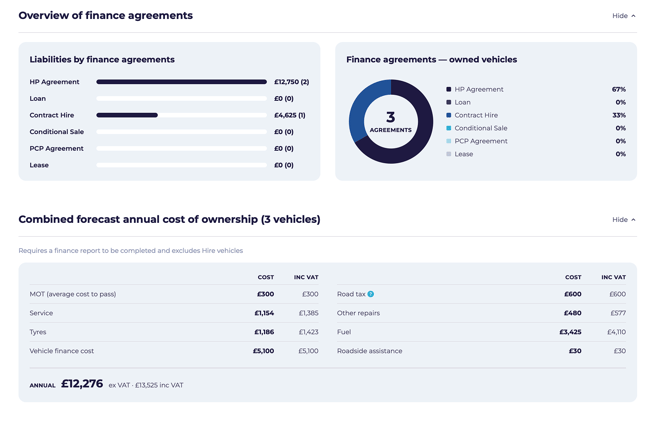
The forecast panel pulls together the estimated annual running cost across your cars, including MOT, servicing, tyres, finance payments, road tax, repairs, fuel and roadside assistance. Figures are shown both excluding and including VAT.
What's next?
- Dig into a car on Your vehicle page.
- Add the people who drive your cars in Managing your family members.
- Run a finance report to see what your car is worth.